WhatsApp is rolling out shared chat themes on Android
WhatsApp is rolling out shared chat themes in Android beta 2.26.46.8, allowing users to synchronize wallpapers and bubble colors across both sides of a chat.
By Dillip Chowdary • Nov 20, 2026 • Source: WABetaInfo
At a glance
- Feature
- Shared chat themes
- Compatibility
- WhatsApp beta for Android 2.26.46.8
- Prior testing
- WhatsApp beta for iOS 26.37.10.16
- Availability
- Select Google Play Store beta testers
- Privacy model
- End-to-end encrypted image sharing
- General release
- Not yet announced
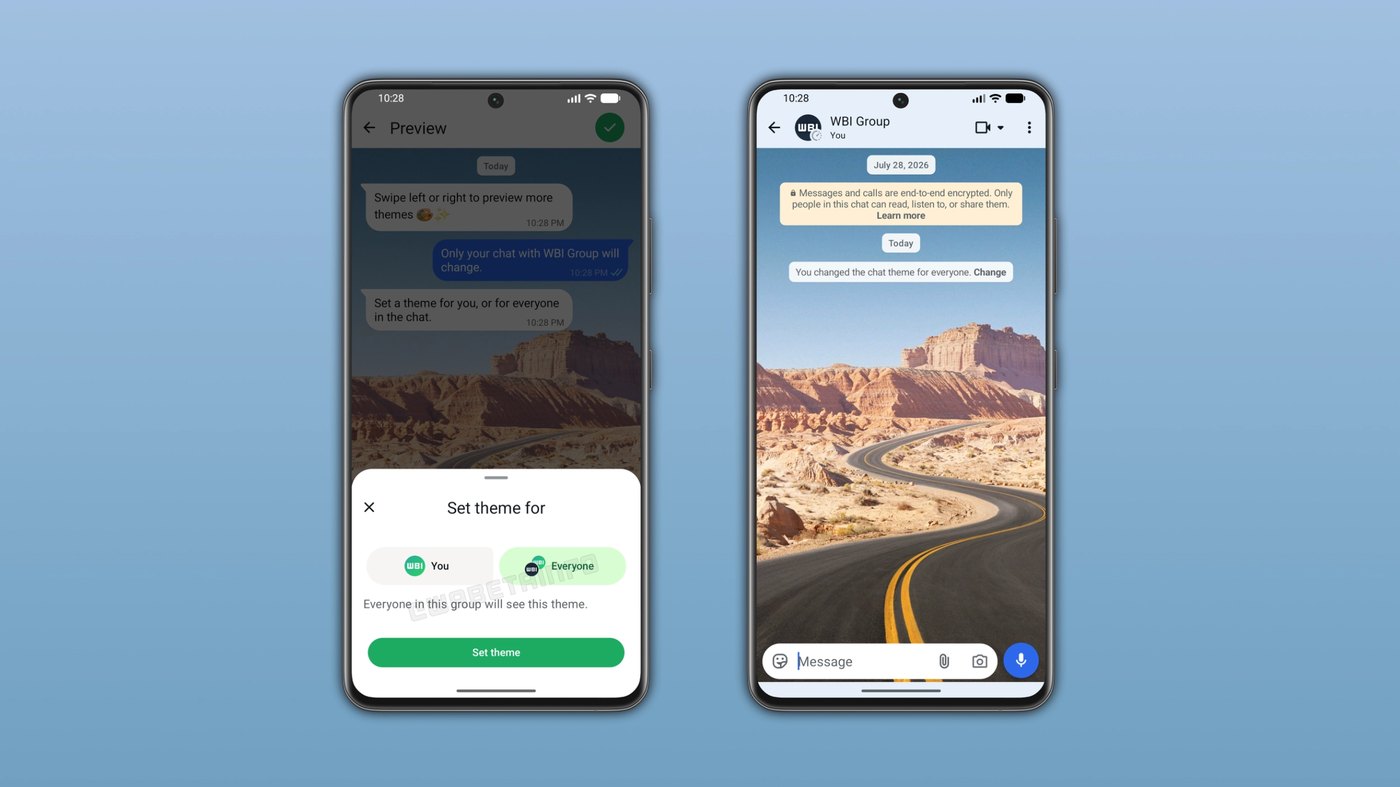
WhatsApp has begun deploying shared chat themes across its Android messaging client, allowing users to synchronize visual conversation styles with other participants simultaneously. According to WABetaInfo's report, the platform enables people to select custom wallpapers or predefined themes that automatically apply across both sides of an exchange. This capability removes the requirement for recipients to manually adjust interface colors or download matching backgrounds on their own hardware.
This breakdown details the configuration steps, group messaging rules, security architecture, and rollout schedule for Android beta participants managing personal or community chats. Power users, community administrators, and everyday messaging contacts will discover how coordinated styling operates across active dialogues without compromising messaging privacy. It also explores the technical progression from earlier iOS testing builds to the latest Android beta deployment.
01Cross-platform synchronization and beta build rollout
The arrival of synchronized visuals on Android follows earlier testing detected in the WhatsApp beta for iOS 26.37.10.16 build. In that previous testing cycle, developers introduced options permitting testers to apply aesthetic adjustments locally or broadcast them directly across conversations. Those tests demonstrated that synchronized chat elements could establish identical wallpaper graphics and chat bubble colors between conversation partners without separate configurations.
Engineers expanded the deployment to Google Play Store testers through the WhatsApp beta for Android 2.26.46.8 release. Community contributors including Sc, FastenM, UnluckyTester, Sniper, Muhammad Hammad, flakoflow, and shw_9876 reported the appearance of the new selection controls. The build introduces a dedicated settings switch that governs whether an applied theme remains private or displays for every active participant.
| Theme setting option | Visual elements applied | Audience visibility |
|---|---|---|
| Apply for myself | Wallpaper and chat bubble color | Single local account |
| Share with everyone | Wallpaper and chat bubble color | All chat participants |
The selection interface provides clear boundaries between localized customizations and shared presentation choices across active dialogues. Selecting personal application retains visual modifications exclusively on the authoring smartphone screen without influencing other members. Conversely, choosing broad distribution instantly transmits the corresponding wallpaper and accent color profile to connected participants.
02Overflow menu configuration and sharing steps
Initiating a shared appearance requires navigating the standard conversation tools embedded directly within the individual or group dialogue screen. The updated interface relies on familiar conversation management menus rather than requiring complex system settings adjustments. Users can complete the full configuration process within seconds by following five sequential actions.
- Open target conversation Launch WhatsApp and enter the specific individual or group chat window.
- Access menu options Tap the three-dot overflow menu located in the top corner and choose Chat theme.
- Select visual styling Browse available wallpapers or color themes to pick the desired backdrop.
- Choose sharing scope Select the option to share the theme with everyone within the bottom sheet prompt.
- Apply synchronized design Confirm the choice to update chat bubbles and background artwork across all screens.
Once confirmed, the underlying application triggers an immediate graphical update across the conversation window on both sides. The bottom sheet selector prevents accidental distribution by explicitly requiring users to state their intended sharing audience before saving changes. Should any participant dislike the new environment, they retain full autonomy to reopen the theme page and configure a different aesthetic.
Advertisement
Tech Pulse Daily
Get tomorrow's pulse first
Join engineers who read Tech Pulse before stand-up. Free, weekday mornings.
03Automated in-chat alerts and visual synchronization
Recipients in an updated conversation experience the styling change without performing manual software downloads or configuration steps. When a participant commits a new shared design, the corresponding background wallpaper and message bubble colors render synchronously across connected clients. This instant transition guarantees that every participant views an identical graphic layout during active messaging exchanges.
To preserve transparency, WhatsApp inserts an automated system message directly into the chat flow immediately after any theme deployment. This notification explicitly identifies the exact account holder responsible for initiating the visual revision and marks the precise moment of modification. Consequently, no participant is left wondering why their interface colors shifted or which contact initiated the styling adjustment.
Individual control remains intact despite the centralized broadcast nature of the synchronized customization feature. Members who prefer alternative color palettes or find a shared background distracting can instantly navigate back to their theme controls. Selecting a personal theme replaces the incoming broadcast, ensuring users retain authority over their device readability.
04Group conversation support and member permissions
The shared customization architecture functions across multi-party group dialogues as well as one-on-one direct messages. Every enrolled participant within a group conversation holds equal technical permission to choose and distribute a new visual layout. When an individual submits a group-wide theme, the chosen wallpaper and bubble colors propagate instantly to every member of the roster.
Group transparency follows the same operational model as direct chats by displaying a prominent system event in the message log. The broadcast notification announces the exact sender name so the entire room remains aware of who altered the collective visual environment. This automated audit trail prevents confusion when multiple people participate in rapid group discussions.
Group governance remains open because any member retains the ability to update or replace the active theme at any time. This collective design flexibility arrives as WhatsApp expands group chat scale, which recently expanded to support communities of up to 1500 members. Open editing permissions mean groups can collaboratively establish shared identities or rotate themes without relying on administrative intervention.
05Custom gallery wallpapers and cryptographic protection
Personalization extends beyond WhatsApp's catalog of predefined visual presets to include custom imagery stored locally on user devices. Individuals can import photos directly from their smartphone galleries or personal photo libraries to serve as the shared backdrop. The application transfers the custom graphic across the conversation so all participants view the exact user-selected image.
Security architecture governs the transmission of personalized wallpaper media to maintain user privacy throughout the sharing process. All custom shared wallpapers remain shielded by the platform's native end-to-end encryption protocol during transit. Because encryption keys remain exclusive to participant devices, WhatsApp cannot inspect, monitor, or store the specific image files chosen by conversation members.
Note: Shared chat themes are currently limited to select participants running the WhatsApp beta for Android 2.26.46.8 release on the Google Play Store. The company is staging a progressive rollout that will reach additional beta accounts over the coming weeks. WhatsApp has not yet announced an official timeline for the broad public release to general production users.
Frequently asked questions
How do users share a chat theme on WhatsApp for Android?
Users open an individual or group conversation, tap the three-dot overflow menu, and select Chat theme. After selecting a preset theme or custom wallpaper, they choose the option in the bottom sheet to share the theme with everyone.
Can group chat members override a shared theme set by someone else?
Yes, any member of a group chat can update or replace the theme at any time. When a member changes the theme, WhatsApp displays an in-chat system message informing everyone who initiated the change.
Can users share custom gallery photos as chat wallpapers?
Yes, users can choose any custom image from their device gallery or photo library as a shared wallpaper. Shared custom wallpapers are protected by end-to-end encryption, meaning WhatsApp cannot view the selected images.
Which WhatsApp versions support shared chat themes?
The feature is currently rolling out to select testers on WhatsApp beta for Android 2.26.46.8 via the Google Play Store. It was previously tested on WhatsApp beta for iOS 26.37.10.16, with broader release rolling out over coming weeks.
Sources

Author
Dillip Chowdary
Writes Tech Bytes coverage of AI, engineering, and the tools that actually ship. Editor of Tech Pulse Daily.
Related on Tech Bytes
Advertisement