WhatsApp is working on a refreshed settings interface on Android
WhatsApp is testing a settings redesign on Android beta 2.26.43.3, adopting Material Design 3 Expressive segmented lists with rounded grouped cards.
By Dillip Chowdary • Nov 01, 2026 • Source: WABetaInfo
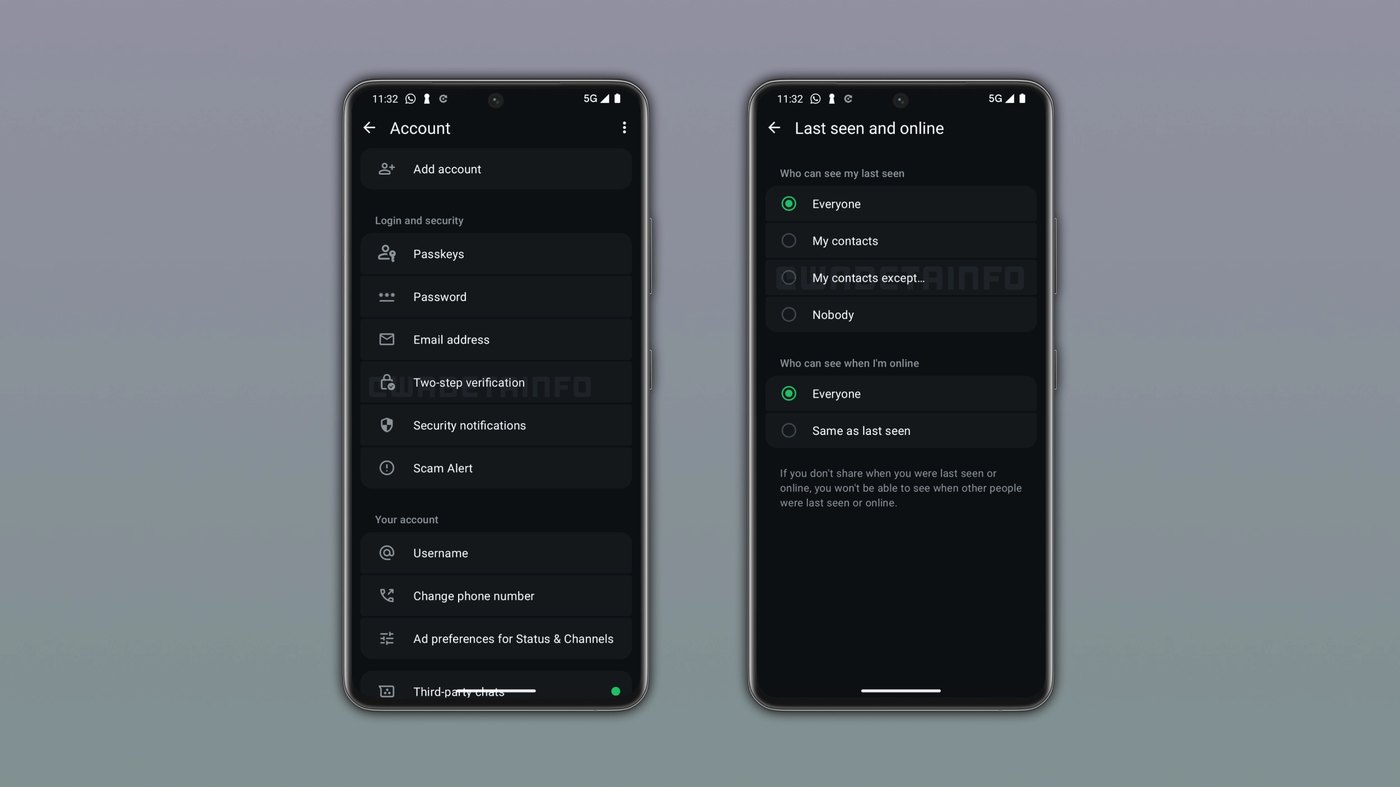
WhatsApp is developing a visual redesign for its settings menu on Android, transitioning from flat lists to structured, containerized controls. The interface organizes settings into rounded cards adopting the Material Design 3 Expressive segmented list pattern across the operating system. According to WABetaInfo's report, the layout surfaced in WhatsApp beta for Android 2.26.43.3 alongside revisions to chat backups, payment management, group tools, and profile cover photos.
This report breaks down WhatsApp's updated interface structure, detailing how the refreshed visual language operates across various configuration menus and how adjacent platform tools alter everyday messaging workflows. Designed for Android and iOS smartphone users, community administrators, and group members tracking WhatsApp releases, this overview provides complete technical specifics on the upcoming changes across account preferences, cloud storage, and large community coordination.
WhatsApp is working on a refreshed settings: what actually changed
The core update replaces WhatsApp's legacy flat settings hierarchy with grouped modular cards featuring distinct rounded corners. Under WhatsApp beta for Android 2.26.43.3, options no longer appear as uninterrupted vertical rows separated merely by thin dividing lines. Instead, related options sit inside cohesive containers styled after Material Design 3 Expressive segmented list guidelines. The top entry inside each designated cluster features pronounced rounded corners on its upper edges, while the final entry curves inward along its lower boundary across Account, Privacy, and Notification menus.
Alongside the main settings refresh, WhatsApp redesigned the chat backup screen across both Android and iOS devices. The new screen separates the primary backup display from deeper configuration options. Users see current backup status and a manual backup trigger on the main page, while automated backup frequency, video toggles, and end-to-end encryption move to a separate page. On Android, this sub-screen adds a Previous backups section letting users delete redundant archives to reclaim local storage space, while iOS users gain direct toggles to disable iCloud backups.
WhatsApp is working on a refreshed settings: how it works
Navigating the refreshed preference system relies on compartmentalized categories where related tools share distinct visual containers. Within application settings, users encounter a newly integrated payments management hub tied directly to Accounts Center infrastructure. Opening the payments area provides immediate access to add payment methods without jumping between disparate third-party web portals, and users can save physical shipping information directly on that screen. This configuration infrastructure complements WhatsApp Payments, which currently operates across four active national markets: India, Brazil, Singapore, and Mexico, preparing the platform for broader international commerce.
Profile personalization also ties into the redesigned interface through customizable profile cover photos across Android and iOS beta releases, including WhatsApp beta for iOS 26.43.10.70. Users tap the Edit button on their profile page to capture a fresh picture, pick an existing image from their device gallery, or prompt Meta AI to generate a custom visual header. Once saved, the cover photo displays prominently at the summit of both the profile overview and the top of the main application settings page, visible alongside the circular profile picture.
Advertisement
Tech Pulse Daily
Get tomorrow's pulse first
Join engineers who read Tech Pulse before stand-up. Free, weekday mornings.
WhatsApp is working on a refreshed settings: why it matters now
Modernizing the preference hierarchy resolves long-standing navigation friction while aligning WhatsApp with updated design patterns across modern mobile operating systems. Grouping settings into rounded containers reduces visual clutter on large displays, ensuring users quickly identify critical security and notification toggles without scanning extensive, undifferentiated menus. Moving secondary backup options like encryption and video storage to their own sub-screen prevents accidental misconfigurations while giving users clearer oversight of data consumption. For Android users running low on storage, inspecting and deleting previous duplicate backup packages directly addresses persistent disk bloat without reinstalling.
The broader platform additions establish functional parity across operating systems while addressing scale bottlenecks in group communication. WhatsApp announced four specific group enhancements, including the capability to pin important messages permanently to the top of chat windows rather than restricting choices to 24 hours, 7 days, or 30 days. Group members can also transmit chat history to newly admitted participants by tapping their contact name, share dedicated group status posts visible only within that collective space, and filter conversations by mentions and direct replies to stay organized.
WhatsApp is working on a refreshed settings: who is affected
Everyday messaging participants on both Android and iOS will notice immediate functional shifts once these interface adjustments move beyond developer testing into broader distribution. Beta participants testing WhatsApp beta for Android 2.26.43.3 and WhatsApp beta for iOS 26.43.10.70 already interact with early components, such as cover photo personalization and partitioned backup workflows. On iOS, participants will also interact with an incoming dedicated media hub placed inside application settings, which collects received photos, videos, and links across conversations into a single caption-searchable screen while excluding disappearing media files.
Community leaders, administrators, and broadcast channel managers face substantial workflow shifts through newly engineered organizational systems. WhatsApp is testing Organizations, a dedicated utility allowing community admins to oversee large collectives and monitor complete membership rosters alongside corresponding sub-group allocations through a single View all dashboard. Meanwhile, broadcast followers on Android beta build 2.26.43.2 receive a channel migration tool to transfer feeds from the Updates tab into the primary Chats tab, automatically suggesting active channels for the chat list and rarely visited broadcasts for the archive.
WhatsApp is working on a refreshed settings: what to watch
Future production rollouts depend on the successful stabilization of these varied beta tracks across global app distribution channels. WhatsApp is actively refining an adaptive bottom navigation bar alongside the segmented settings interface to provide a cohesive visual style across modern Android form factors. Because certain elements remain restricted to specific development branches, availability will expand gradually rather than through an instantaneous worldwide switch. Users unable to view the rounded Material Design 3 Expressive cards or revised backup screens must wait for successive client iterations through official store updates.
Observers should also monitor regional payment expansion as the unified Accounts Center payment interface matures on mobile devices. With integrated payment methods and local shipping profile storage already built into testing builds, Meta possesses the software foundation required to expand transactions beyond India, Brazil, Singapore, and Mexico into emerging retail territories. Tracking how community leaders adopt the Organizations dashboard will indicate how WhatsApp handles administration at scale, while successive testing builds demonstrate whether these segmented interface cards and media curation hubs become standard across the client.
Developer Action Items
- ☐ Verify the claim on the official Meta / iOS / Android page (or WABetaInfo), not from this recap alone.
- ☐ Name the surface that moved — API, policy, model, hardware, or commercial terms — before you Slack the thread.
- ☐ Assign one owner a day to read the primary material and decide: this-sprint, this-quarter, or noise.
- ☐ Do not change production on day-one coverage. Watch the vendor changelog and one independent write-up first.
WhatsApp is working on a refreshed settings FAQ
What design pattern is WhatsApp using for the new settings interface?
WhatsApp is adopting the Material Design 3 Expressive segmented list pattern, grouping settings into rounded containers.
How does the redesigned chat backup screen work?
The main screen displays backup status and a manual backup trigger, while automated frequencies, video inclusion, and end-to-end encryption move to a separate page. Android users also get a Previous backups section to delete old archives.
In which countries is WhatsApp Payments currently available?
WhatsApp Payments is currently available in four countries: India, Brazil, Singapore, and Mexico.
How can users create profile cover photos in WhatsApp beta?
Users can tap the Edit button on their profile page to take a new photo, choose one from their gallery, or generate an image using Meta AI.
Sources

Author
Dillip Chowdary
Writes Tech Bytes coverage of AI, engineering, and the tools that actually ship. Editor of Tech Pulse Daily.
Related on Tech Bytes
Advertisement