WhatsApp is working on an adaptive bottom navigation bar
WhatsApp is testing an adaptive Android navigation bar that shrinks into a compact floating pill during downward scrolling to expand vertical chat space.
By Dillip Chowdary • Oct 25, 2026 • Source: WABetaInfo
WhatsApp is testing an adaptive bottom navigation bar on Android that alters its size during scrolling, according to details in WABetaInfo's report on recent beta builds. The navigation bar condenses into a compact floating pill when users scroll down and restores to full width when scrolling up. This update arrives alongside several beta features across Android and iOS spanning scheduled messages, local call screening, an in-app browser, and Reels sharing shortcuts.
This report details the technical mechanics of the adaptive navigation bar, its operational similarities to existing Meta interfaces, and companion beta tools across mobile platforms. Android and iOS users, beta testers, and community managers will find clear breakdowns of navigation responsiveness, account linking rules, call screening privacy protections, and testing availability across platforms.
WhatsApp is working on an adaptive bottom: what actually changed
The primary adjustment modifies how the bottom navigation container occupies screen geometry during active browsing. In its standard resting configuration, WhatsApp expands the navigation bar across the full display width, offering direct access to main tabs. When a user scrolls down through the chat list, the software gradually reduces the bar in both width and height. The container condenses into a compact floating pill hovering above the bottom margin. The tab icons remain visible inside this compact form, but the bar takes up less display space than before.
This responsive behavior represents the fourth structural refinement WhatsApp has introduced to the Android bottom navigation interface during recent development cycles. The development team previously reorganized the general layout along the bottom display edge, stripped text tab labels to emphasize clean icons, and polished the active tab indicator for clearer identification. WhatsApp continues experimenting with the navigation bar, so the final design may still look different. The visual dimensions, container proportions, and icon spacing could experience further refinements before reaching general availability.
WhatsApp is working on an adaptive bottom: how it works
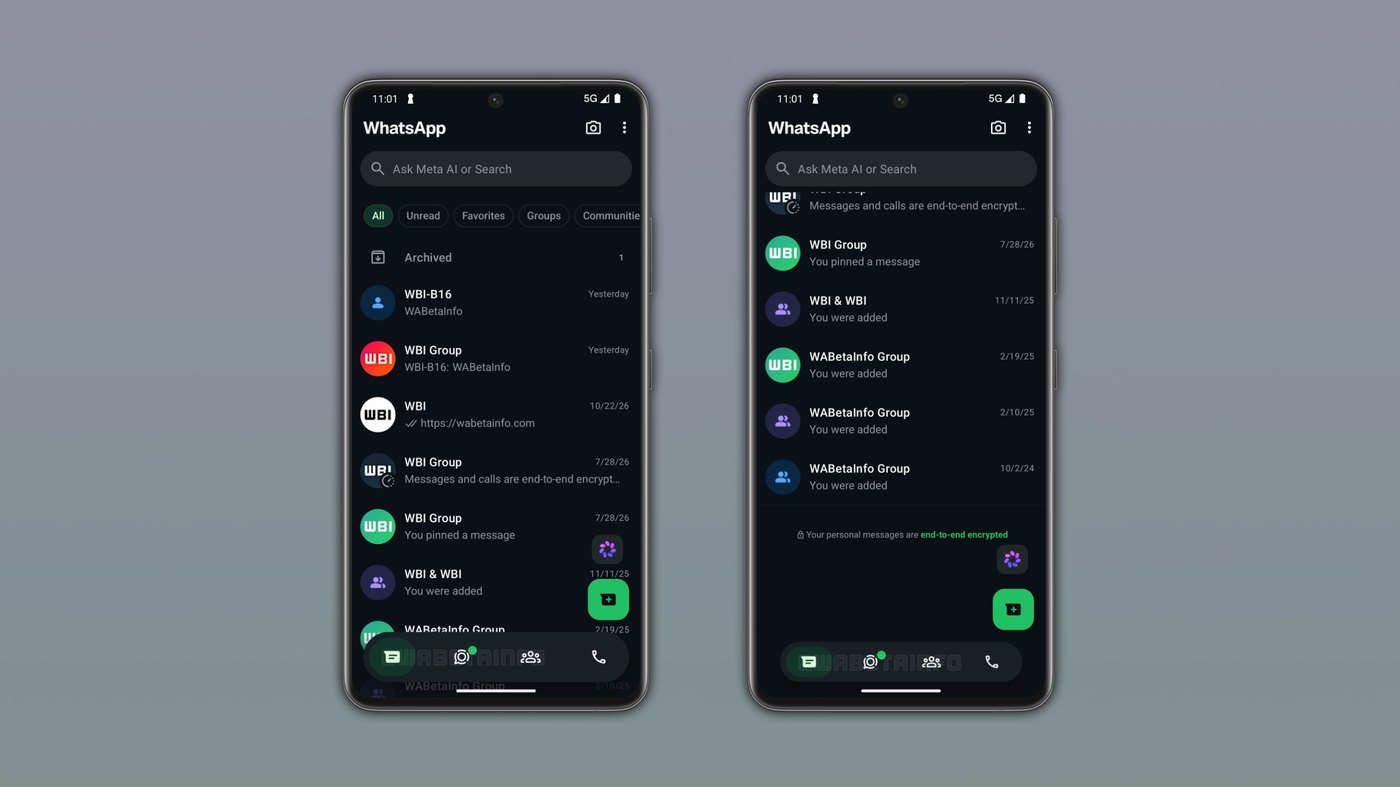
The dynamic behavior relies on continuous scroll tracking within the Android chat list to govern container size. When downward scrolling is detected, WhatsApp gradually reduces the navigation bar in width and height, shifting the full-width strip into a compact floating pill. Because the navigation icons remain visible and interactive within the minimized container, users can switch tabs directly without expanding the interface first. Scrolling back up prompts WhatsApp to restore the bar to original full-width dimensions, giving users immediate access to all navigation controls without manual intervention.
This scrolling behavior mirrors the interface architecture Meta already provides on Instagram. Specifically, the bottom navigation bar on Instagram shrinks into a compact pill when users scroll down the main feed and expands back to normal width when they scroll up. WhatsApp applies that established interaction model to make chat browsing feel more dynamic and less intrusive. Rather than completely hiding navigation tools off-screen, the floating pill preserves visible icons while freeing up vertical space, allowing conversation threads to occupy more of the active mobile viewport during continuous reading.
Advertisement
Tech Pulse Daily
Get tomorrow's pulse first
Join engineers who read Tech Pulse before stand-up. Free, weekday mornings.
WhatsApp is working on an adaptive bottom: why it matters now
The interface adjustment accompanies a broader expansion of utility features across the Android application. In the WhatsApp beta for Android 2.26.41.4 update, the platform introduced a call filtering tool with three distinct options. The first option disables filtering, notifying any call regardless of saved status. The second option automatically silences calls from unknown numbers. The third option answers the call to ask why the person is calling, generating a private transcript locally on the device using language packs so recipients can read the caller's response before answering.
Screen optimization is equally critical as WhatsApp incorporates denser social shortcuts and chat filters. With the WhatsApp beta for Android 2.26.42.9 update, an attachment menu shortcut lets users share Reels across Recents, Saved, and Liked tabs. Additionally, WhatsApp added a dedicated filter at the top of the Chats tab alongside Unread, Favorites, and Groups to track mentions and replies, including community chats. An adaptive navigation bar complements these expanding media menus and sorting tabs, ensuring the conversation list remains spacious as functional density increases across the application.
WhatsApp is working on an adaptive bottom: who is affected
The adaptive navigation bar is currently under testing for the Android app and has not reached widespread release. Availability remains limited because certain features stay under active development and are not immediately accessible to all beta testers. Users unable to access the dynamic bar must wait for subsequent client updates or remote rollouts over time. WhatsApp evaluates interface transitions incrementally to verify that the shrinking container behaves smoothly across varied display sizes, aspect ratios, and touch refresh rates before rolling the visual pattern out to standard global accounts.
Companion beta additions also carry specific eligibility criteria depending on platform and account configuration. The Reels attachment shortcut only appears for individuals who explicitly connected their accounts via Accounts Center, remaining hidden for those who opt out of linking. Meanwhile, iOS beta participants gain access to message scheduling by tapping and holding the send button. This feature sets delivery between ten minutes and two weeks in advance. Scheduled items populate a dedicated section within the chat info screen, where senders can view or delete them at any point before delivery.
WhatsApp is working on an adaptive bottom: what to watch
Future releases will determine whether the adaptive pill expands to iOS and how client-side privacy measures perform in real-world conditions. With the WhatsApp beta for iOS 26.41.10.72 update, WhatsApp is developing an in-app browser enabled through app settings. First-time activation presents an informative bottom sheet explaining that browsing runs separately from conversations. Users can open links in default external browsers via the three-dot menu. Browsing data stays stored locally on the device so WhatsApp cannot view visited links, while users can clear cookies and cache directly within settings.
Observers should also monitor customization settings, as seen with other interface additions. The mentions and replies filter at the top of the Chats tab provides full user control, allowing individuals to disable it in settings or move it to a separate More section. If users respond favorably to the adaptive bottom navigation bar during testing, WhatsApp is expected to stabilize the floating pill behavior and make the dynamic layout standard across consumer Android builds, bringing interface parity with scrolling conventions established across Meta's broader application ecosystem.
Developer Action Items
- ☐ Verify the claim on the official Meta / iOS / Android page (or WABetaInfo), not from this recap alone.
- ☐ Name the surface that moved — API, policy, model, hardware, or commercial terms — before you Slack the thread.
- ☐ Assign one owner a day to read the primary material and decide: this-sprint, this-quarter, or noise.
- ☐ Do not change production on day-one coverage. Watch the vendor changelog and one independent write-up first.
WhatsApp is working on an adaptive bottom FAQ
How does the adaptive bottom navigation bar behave during scrolling on WhatsApp?
When users scroll down through conversations, the navigation bar shrinks in width and height into a compact floating pill with visible icons. Scrolling back up restores the bar to its full-width format.
Which other Meta application uses a matching navigation bar design?
Instagram uses the same dynamic pattern, shrinking its bottom navigation bar into a compact pill during downward feed scrolling and expanding it when scrolling back up.
What call filtering options are being tested in the Android beta?
WhatsApp beta for Android 2.26.41.4 offers three options: disabling filtering, silencing unknown calls automatically, or answering calls to generate on-device transcripts using language packs before the user answers.
How does message scheduling work on the WhatsApp iOS beta?
Users tap and hold the send button to schedule messages between 10 minutes and two weeks ahead, managing or deleting pending dispatches in the chat info screen.
Sources

Author
Dillip Chowdary
Writes Tech Bytes coverage of AI, engineering, and the tools that actually ship. Editor of Tech Pulse Daily.
Related on Tech Bytes
Advertisement