ZapFast: A fast, native WhatsApp client in Rust and egui
ZapFast delivers an unofficial native WhatsApp desktop client built in Rust and egui that launches in under a second and operates at 200 MB of idle memory.
By Dillip Chowdary • Nov 08, 2026 • Source: github.com
Developer crmne released ZapFast, an unofficial desktop WhatsApp client engineered in Rust that completely strips out the browser engine in favor of the lightweight egui immediate-mode graphical toolkit and the fastframe application framework. According to github.com's report, the open-source client operates on Linux, macOS, and Windows by establishing a direct companion device session through the whatsapp-rust library. In comparative testing conducted on Linux, ZapFast launches in under one second and operates at approximately 200 MB of idle system memory, compared against 1.13 GB of idle memory consumption measured on WhatsApp Web.
This technical breakdown examines the operational architecture, setup steps, security posture, and resource footprints of ZapFast for cross-platform desktop users and system administrators. The software targets workstation users seeking responsive communication software free of Electron or Chromium overhead, individuals managing multiple WhatsApp telephone numbers on a single computer, and international users needing localization across English, Chinese (Simplified and Traditional), Dutch, French, German, Indonesian, Italian, Portuguese (Brazil), Russian, Spanish, and Turkish.
A fast, native WhatsApp client in Rust: what actually changed
ZapFast eliminates the conventional browser runtime that underpins official web wrappers, replacing the typical multi-process web stack with native binaries written in Rust. The project combines the egui immediate-mode interface system with fastframe, an internal framework that also powers sibling applications such as the Spotifast native music client. In Linux system resource audits, this architecture trims idle memory utilization down to around 200 MB, achieving a fivefold reduction from the 1.13 GB baseline consumed by WhatsApp Web while achieving sub-second application launch times across supported environments.
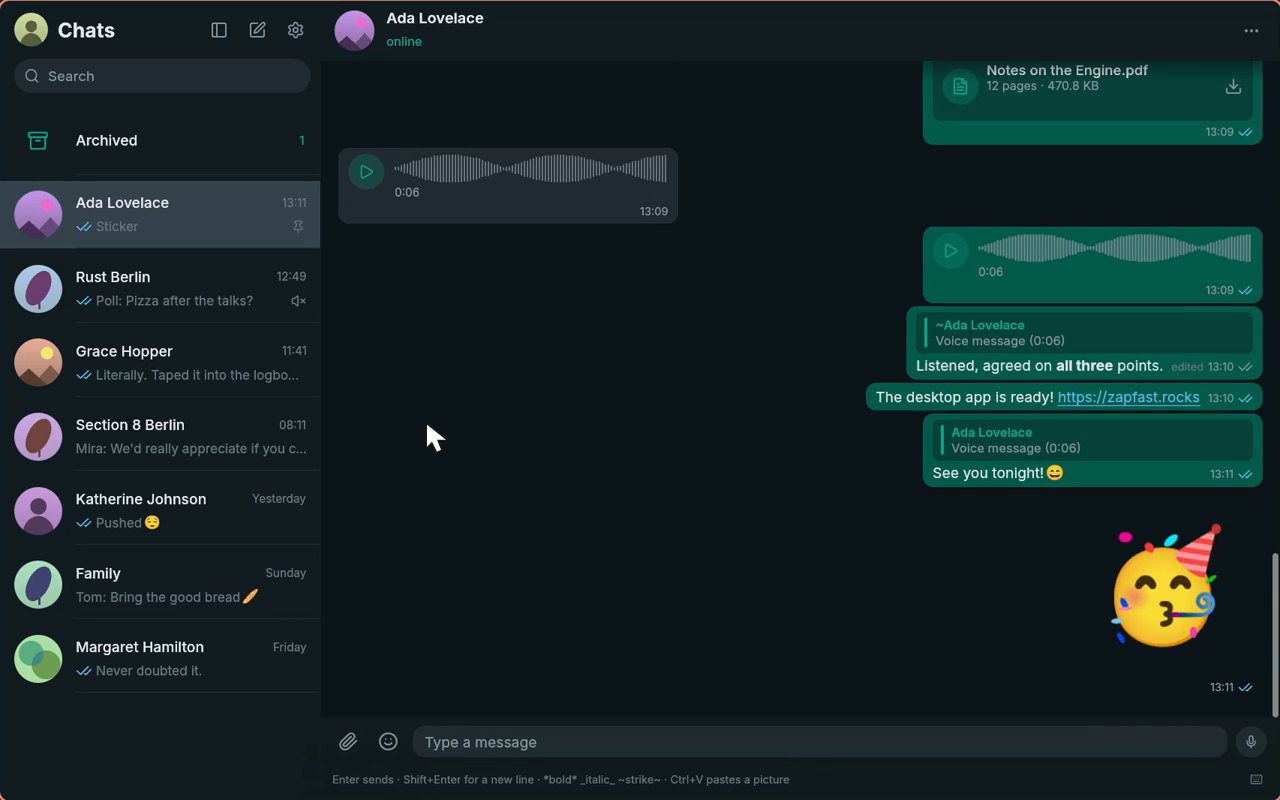
Visual and functional desktop integration expands beyond simple messaging to mirror the core phone interface natively. ZapFast renders typography with the Inter typeface alongside Noto Color Emoji, integrates Lucide icons for interface controls and chat wallpaper doodles, and reuses legacy notification audio files sourced from the Pidgin instant messaging project. Users gain immediate-mode controls including cross-message text selection, system tray minimization, custom or system appearance themes with desktop palette tracking on Omarchy, and support for running multiple linked phone accounts simultaneously inside a single window interface.
A fast, native WhatsApp client in Rust: how it works
Connecting ZapFast relies on the standard WhatsApp companion device protocol powered by the underlying whatsapp-rust backend library. Upon startup, the client generates a pairing QR code on the display, which users scan through the Linked Devices menu under WhatsApp settings on their mobile handsets. Alternatively, operators can choose the phone number pairing route by generating and inputting an eight-character verification code directly into the mobile application. Once linked, the connection persists across application restarts without requiring the physical phone to stay connected to access previously synchronized conversations.
The local storage model maintains synchronized conversation logs in an encrypted archive housed directly on the host computer filesystem. Recent dialogue downloads during initial pairing, while earlier historical logs pull down from the phone on demand as users scroll upward through chat timelines. In active conversations, ZapFast handles formatted text, message edits, replies, emoji reactions, forwards, polls, stickers, and animated GIFs, while media pipelines play audio recordings, circular video notes, and clips directly in place without routing traffic through third-party servers.
Advertisement
Tech Pulse Daily
Get tomorrow's pulse first
Join engineers who read Tech Pulse before stand-up. Free, weekday mornings.
A fast, native WhatsApp client in Rust: why it matters
Eliminating heavy web engines resolves persistent workstation latency and background resource starvation commonly associated with running modern chat wrappers on developer workstations. Because traditional wrappers rely on embedded Chromium distributions, maintaining communication tools throughout the workday frequently consumes multiple gigabytes of volatile memory and creates sluggish window switching. By leaning on native system libraries, immediate-mode GPU rendering via egui, and compiled Rust code, ZapFast provides responsive scrolling, instant message rendering, and low background power usage across Linux, macOS, and Windows systems.
Data independence and export control also shift directly back to the workstation owner rather than remaining locked in remote browser caches. The client incorporates an export mechanism that packages stored chat histories into structured plain text files or standalone ZIP archives containing all downloaded media attachments. Privacy controls permit locking specific confidential conversations behind a passcode or securing the entire application window behind a master app lock, while local encryption shields stored conversation archives from other processes on the operating system.
A fast, native WhatsApp client in Rust: who is affected
The release directly benefits developers, system administrators, and desktop power users across diverse operating systems who rely on WhatsApp for daily operations. macOS operators can install the application through the Homebrew package manager using brew install --cask crmne/tap/zapfast or download precompiled bundles. Arch Linux users can access community builds via yay -S zapfast-bin, while wider Linux distributions are served through Nix packages, standalone AppImage bundles, and direct source compilation via Cargo. Windows users obtain dedicated installation binaries provided on the project download repository.
For technical teams evaluating native desktop application development, ZapFast serves as a practical implementation model for the fastframe framework alongside egui. Developers looking to review the interface layout, notification mechanics, and visual themes without pairing an active phone account can execute cargo run --features demo -- --demo to spin up an interactive mock environment. The codebase documents internal architectural rules in AGENTS.md, packaging specifications across platforms in PACKAGING.md, and interactive tours within DEMO.md under an MIT open-source license.
A fast, native WhatsApp client in Rust: what to watch
Despite substantial operational gains, deploying ZapFast carries distinct policy constraints and terms-of-service risks that enterprise and personal users must navigate. The software remains an unofficial client with zero affiliation, backing, or partnership with Meta Platforms or WhatsApp LLC. Because WhatsApp enforces automated protections against unsanctioned third-party access tools, connecting to WhatsApp servers through third-party protocols like whatsapp-rust introduces the possibility of temporary or permanent telephone account suspension, requiring users to evaluate account safety tradeoffs before linking production numbers.
Future development tracking centers on community contributions, platform-specific notification behaviors, and feature parity with evolving WhatsApp protocols. Native desktop notifications currently rely on fastframe to manage per-chat routing, audio previews, notification ceilings, and automatic withdrawal when messages are marked as read, subject to host OS permission settings. Users and package maintainers track issue triage, bug submissions, feature proposals, and upstream documentation updates directly through the project community portal hosted at zapfast.rocks and the official GitHub repository issue templates.
Developer Action Items
- ☐ Diff the official changelog for GitHub / Framework / macOS 1.13 before you bump — APIs, defaults, and removed flags only.
- ☐ Install through the vendor's documented channel in staging; keep a one-command rollback and time-box the canary.
- ☐ Grep your repo for old flag names, lockfile pins, and plugin versions that the notes mark as breaking.
- ☐ Prefer the first patch cut over the day-zero tag unless you have a reason to be on the leading edge.
- ☐ If Hacker News Front Page did not name a region, plan, or SKU, screenshot the official availability line before you promise it to users.
A fast, native WhatsApp client in Rust FAQ
What are the memory and launch speed benchmarks for ZapFast?
In Linux testing, ZapFast launches in under one second and consumes approximately 200 MB of idle RAM, compared against 1.13 GB of idle memory used by WhatsApp Web.
How does ZapFast link to a WhatsApp account?
Users link their account by scanning a displayed QR code in WhatsApp Linked Devices or by entering an eight-character code on their phone, utilizing the whatsapp-rust companion device library.
Can ZapFast run without an active WhatsApp account?
Developers and evaluators can inspect the user interface without linking an account by compiling the codebase with cargo run --features demo -- --demo.
What risks are associated with using ZapFast?
ZapFast is an unofficial client not affiliated with WhatsApp or Meta, and connecting through unofficial software may breach WhatsApp terms of service and lead to account suspension.
Sources

Author
Dillip Chowdary
Writes Tech Bytes coverage of AI, engineering, and the tools that actually ship. Editor of Tech Pulse Daily.
Related on Tech Bytes
Advertisement